How Print MIS Systems Improve Efficiency in Printing Businesses

PrintXpand · Pratik Shah
Oct 19, 2026 · 5 min read

The US printing industry employed 420,400 people in January 2020. By September 2026, that number was 335,800. That's roughly one in five jobs gone, while customers still expect the same turnaround times or faster.
Fewer people doing the same amount of work only adds up if each job takes less effort to move through the shop. Yet nearly half of print service providers in FESPA's 2025 Print Census reported having no automation in place at all.
That gap is where print MIS systems come in. But the usual pitch ("manage everything in one place") misses how they actually make a print business more efficient. An MIS doesn't make presses run faster. It cuts down the time jobs spend waiting, and the time people spend looking for information.
MIS stands for management information system. In printing, it's the software that tracks a job from the first quote to the final invoice.
A typical print MIS handles estimating, job tickets, production scheduling, purchasing, and invoicing. Some include customer management and reporting too. The key point is that each of these works from the same job record, rather than from separate spreadsheets and emails.
If you run a startup or a small business outside print, think of it as an ERP built for companies that make a different product for every order. That's the part generic business software struggles with.
Walk through a busy print shop and most jobs aren't being worked on. They're waiting.
Waiting for a file. Waiting for the customer to approve a proof. Waiting for paper or blanks to arrive. Waiting for a press that's busy with something else. And while jobs wait, people get interrupted: a customer calls to ask where their order is, and someone walks the floor to find out.
None of this shows up as "inefficiency" on a timesheet. Every person is busy. But the job itself might spend four days in the building for two hours of actual production.
So the most useful question about any MIS isn't how many features it has. It's how much waiting it removes.
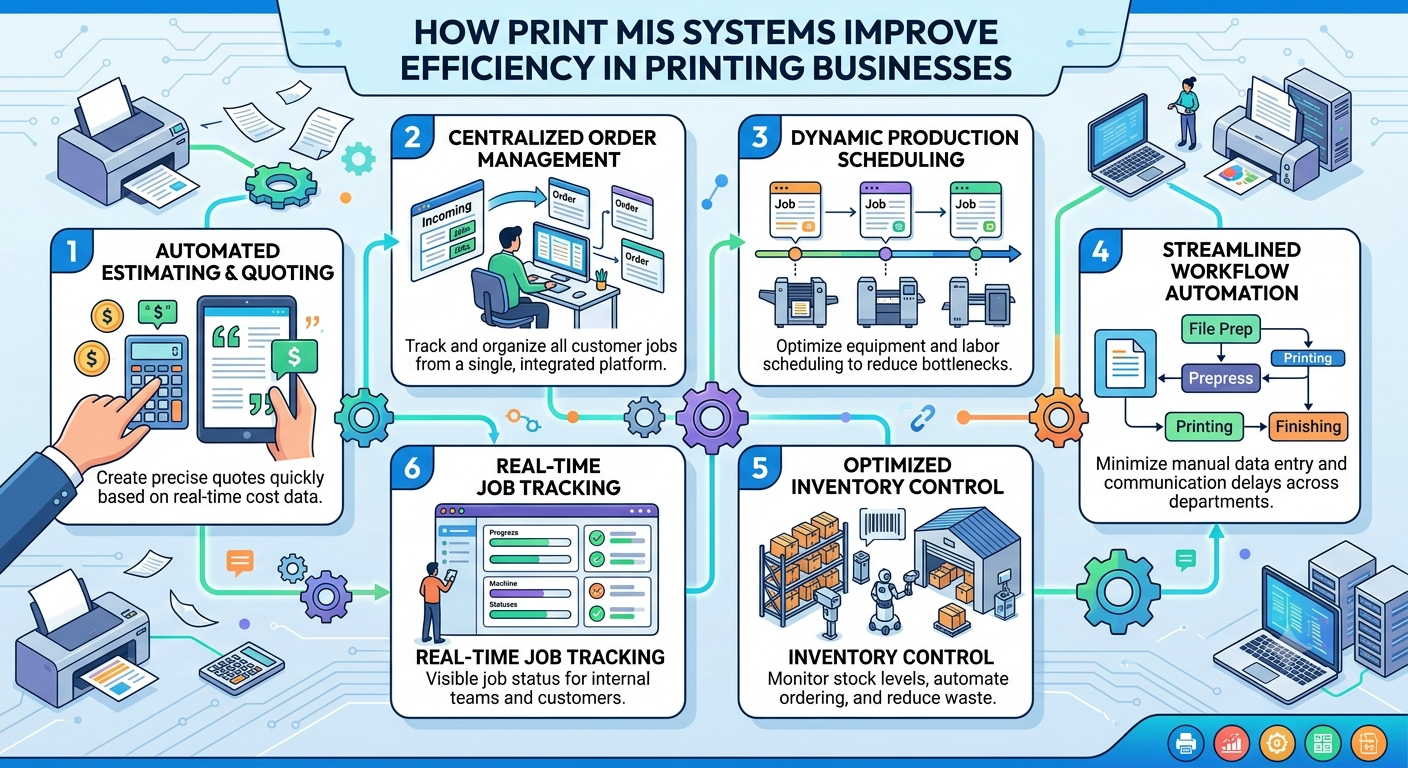
The first efficiency gain is simple. When the estimate becomes the job ticket, and the job ticket becomes the invoice, nobody re-types anything.
In shops without an MIS, the same job details often live in a quote file, a printed work order, an email thread and the accounting system. Every copy needs updating when something changes, and someone always forgets one.
With a single job record, a change to quantity or stock shows up everywhere at once. If orders come from a web-to-print store, a good MIS creates the job ticket automatically, with the artwork and specs attached.
Most small print shops schedule from memory and a whiteboard. That works until it doesn't. Usually that happens on a Thursday afternoon with three rush jobs and a press down for maintenance.
An MIS scheduler shows every job against the actual capacity of each machine. Conflicts with due dates become visible before they turn into missed deadlines, not after.
It also opens up a quieter gain. When you can see the whole week's queue, you can group similar jobs, like runs on the same stock or with the same ink setup. Fewer changeovers means less make-ready time and less waste. This is one of the few places where an MIS genuinely does help the press, indirectly.
Will a scheduler fix a shop that's simply over capacity? No. But it'll show you that you're over capacity days earlier, which is when you can still do something about it.
"Where's my order?" is one of the most expensive questions in a print shop, because answering it usually means finding a person, who then finds the job.
Shop floor tracking fixes this. Operators scan a code on the job ticket as work moves from one stage to the next. The MIS then knows where every job is, and so does anyone who checks it, including customer service.
The efficiency gain isn't the scan. It's every interruption that doesn't happen because the answer is already on screen. And for a manager, it shows where jobs pile up, which is usually the real bottleneck rather than the one everyone assumes.
A job that can't start because the stock hasn't arrived is pure waiting time.
An MIS can create purchase orders when a job is confirmed, based on what that job needs. Some systems also check supplier inventory before the job is committed, so you don't promise a delivery date on blanks that are out of stock. That one check can save an awkward phone call a week later.
It depends on your suppliers. If you buy most materials from one local merchant with next-day delivery, this matters less. If you source from several distributors with different lead times, it matters a lot.
Most print shops can tell you what a job was quoted at. Far fewer can tell you what it actually cost.
When an MIS records actual time and materials against each job, you can compare them to the estimate. Over a few months, patterns appear. Maybe a certain finish always takes longer than estimated, or one product line keeps losing money.
That feedback makes future estimates more accurate. And accurate estimates are an efficiency gain of their own, because the shop stops taking on work it can't produce at a profit.
Here's what the brochures leave out. An MIS often makes a shop less efficient for the first few months.
Someone has to set up products, pricing rules, machines and costs. Staff who were used to paper tickets now have to scan jobs and record their time. Many shops run the old process and the new system side by side for a while before switching over, which means doing everything twice.
The data is also only as good as the discipline behind it. If operators skip scans, the job tracking is wrong. If actual costs aren't recorded, estimates never improve.
And a very small shop, with two or three people and a handful of jobs a day, may not need a full MIS at all. A good order system and a shared calendar might do. The efficiency gains grow as the number of jobs and people goes up.
If you're considering a print MIS, don't start with a feature list. Start by following one ordinary job through your shop and writing down every point where it waits or gets re-typed.
Then pick the system that removes the biggest of those delays first. For most shops, that's re-keying job details and not knowing where jobs are. Scheduling and costing tend to pay off once that foundation is in place.
At PrintXpand, we've seen this across hundreds of print businesses, and the shops that get the most from a print MIS are rarely the ones with the most features switched on. They're the ones that fixed their biggest source of waiting first, then kept going.
Pratik Shah is Creative Head at PrintXpand, a web-to-print and print automation platform serving 350+ print businesses across 40+ countries. He works with commercial printers and packaging companies on the systems they use to take orders and run production. Learn more at printxpand.com.
Sign in to respond and applaud.
No responses yet. Be the first.